


Documentation content is marketing content, folks. Tech-savvy buyers want to peek under the hood before they commit to a purchase. Your docs library instills confidence in that regard. Mighty fine marketing indeed.
I know that technical writers don’t create content with marketing in mind. I know that some technical writers would rather never even hear the “M” word. I’m writing this article with those folks in mind: docs teams, technical writers, DevRel, and the like.
Your content could be educating a wider range of the people who need it. SEO and GEO practices can help you do that (and drive some new sales in the process). I’ll show you how.
Docs are a big part of the conversion journey
I work with a lot of really technical, developer-led brands. I’ve seen this time and again: up to 50% of new customers will visit the docs page before deciding to buy.
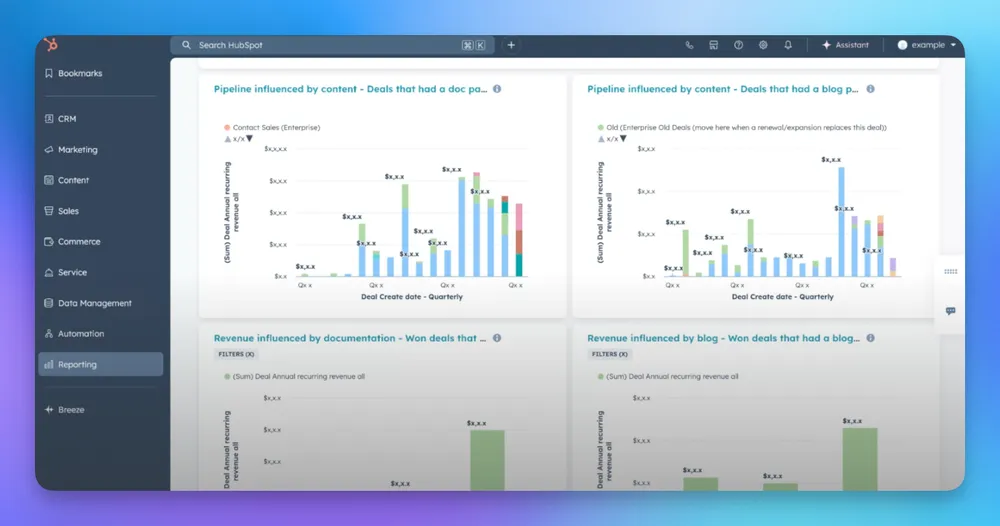
The (anonymized) Hubspot dashboard below shows pipeline data. Specifically, these reports are measuring instances how content has influenced the lead pipeline.

(This little dashboard is split up by content in general, then blog content, and docs content.)
Blogs are more typically written with pipeline in mind. That doesn’t mean that they’re more valuable than docs when it comes to generating pipeline. Check out this side-by-side comparison we pulled from Hubspot.
In this particular example, more deals were influenced by documentation content than blog content. Wild, right?

To be clear: the blog is still driving pipeline in its own right. Both formats are playing a role in conversion. I just want to point out: hundreds of thousands of dollars in pipeline (sometimes millions!) depend on technical content.
The blog can (and often should) have technical content, too. The format is often more narrative, the voice is typically a little more accessible, but the content need not be any less rigorous.
Docs drive awareness via Google and AI search
Some people go to the docs because they’re already active with your product and community. Others end up there because they typed their problem into Google search or an LLM like ChatGPT.
So, my skeptical technical writer friends, welcome to the SEO and GEO portion of this article. (The core principles for SEO and GEO are fundamentally the same. The user experience is different.)
Let’s say that a developer opens Claude and types: “Walk me through the steps for implementing agent guardrails in my app. What libraries should I be looking at?”
Claude answers that query with a list, like this one:

If your brand’s website has a library for agent guardrails then, of course, you want to be on this list.
Sometimes the LLM will cite your documentation as a source for its answer. Users can click directly to your site. Just as often, they’ll review a list like this one and then visit each site directly by typing the library name into their web browser. (In that instance, the traffic will show up as “direct traffic”).
Regardless, citations like these expand the audience for your technical content. You could think of it as great marketing (which it is) or you could think of it as making your expertise more widely available to people who need it. You can’t do either unless that content is visible to search engines.
(Tastefully) optimize your technical content for SEO + GEO
The role of docs content in the marketing funnel is something like this: people discover your docs library, they find it intriguing, so they click over to the marketing side of your website to learn more about the product. A classic motion: awareness, then engagement, then conversion.
To optimize content for that initial awareness stage, you’re optimizing some fundamental content elements. You can become more visible in Google and AI search with simple, reasonable priorities:
- Keep your documentation fresh. Keeping all content updated is important because LLMs like fresh content.
- Write to satisfy specific user needs. Make sure the docs are talking about issues that customers actually care about.
- Don’t skimp on the UX. Make sure that the website is relatively fast. Keep the content library tidy and usable.
If you’re interested in what this looks like for specific types of documentation, this Redocly post shows how to apply SEO practices to your API docs.
One small detail that has a big effect on conversion rate
The docs side of the website needs to be integrated with the product side. It’s a small detail but not always the easiest to implement. I think it comes down to this question:
When somebody lands on your docs page will they be able to immediately understand what your product is about?
If your answer is not an immediate and emphatic Yes then you’ve got some work to do.

For example, I visited a documentation page on the Langfuse site. From a pure categorization standpoint, this docs library is quite nice. But if I showed up here knowing nothing about Langfuse then I could easily leave without knowing anything more about Langfuse. There is no easy way for me to learn anything about their product.
Again, I know that the integration of marketing can make engineers and technical writers feel squeamish. Docs are primarily designed for education and service. That’s part of their strength and we don’t want to dilute that power by overloading them with sales buttons.
Just remember: some visitors might be grateful to know about your product offerings. If you run open source, for example, you can optimize the docs that address certain pain points that your commercial product solves.
Beware of sinking too much time into SEO + GEO hacks
There are a lot of tricks (dare I say “hacks”) out there that people are proposing for GEO optimization. Here’s one that I see a lot: LLMs.txt.
LLMs.txt is a plain text file that sits at the root of your website and lists key pages, descriptions, and links in a format designed to be easy for AI tools to read. The pitch is that without it, AI tools are left to crawl and interpret your site on their own, which may cause them to miss important pages or context.
I don’t think it’s a huge priority and I’m not alone. This is John Mueller talking about how no AI system currently uses llms.txt:

If you go looking for evidence for llms.txt, you will generally only find things that are very anecdotal. I’m not saying that llms.txt is useless. If you get it for free, and you can easily maintain it, then it can be quite useful. But is it worth a huge investment? I don’t think so. Not right now, anyway. If you’re looking for technical boxes to check, there are plenty of other places to start. Focus on site speed, for example, or any of the fundamentals that I mentioned above.
Tools that I use with technical content teams
Keeping a vast library of complex docs up-to-date with product changes is a monumental task already. I’m well aware that tech writers have better things to do than spruce up some old docs with new SEO-friendly keywords. And yet, these tasks do help make your pages more accessible and useful.
Automation and practical analysis go a long way for such tasks. We can integrate all of these daily, monthly, and ad hoc tasks into one coherent content system. Here are tools that I use with technical content teams.
The ércule app
The ércule app indexes your entire library and groups the content based on practical performance metrics. I built this app because I couldn’t find any tools that performed these functions.
For example; groups the top-performing pages as “Stars.” It groups the pages that have shown recent decline in traffic. It's a really good way to very quickly get a view of how your content is doing. You can create custom groups, too.

If you only want to see our pages that are about APIs, for example, you can easily build that stuff and get a sense of what things look like.
- Keep an eye out for pages that are declining in terms of traffic. Is there anything unexpected there?
- Monitor your “star” pages closely. These pages are going to have the biggest (positive and negative) impacts. Do those pages have counterparts on the commercial side of the site as well?
- Compare page performance across different product and feature-specific pages. Features we want to make sure are exposed to users, or are things that we want to create more documentation, more use cases, all of that around.
When you’re looking at content performance for all content – on the docs site and the marketing site – you’re better equipped to make systemic improvements.
Content linter
Software developers use a linter to maintain quality control in the code they write. We use a tool that does the same for written content like docs (and blogs and really any page on a website).

I use the linter to run a variety of qualitative and quantitative tasks…
- Flag all the content that needs to be updated
- Track and manage updates
- Prioritize updates by topic or performance data
- Flag aberrations in performance
- Identify gaps in content subject-matter
For example, I’ll export a group of Star pages from the ércule app. I’ll use the content linter to identify which Star pages are in the most urgent need of a content update.
You can build your own SEO and GEO automations, too
Currently, my team builds our automation tools mostly in n8n. It’s a no-code workflow builder.
That content linter, for example, was built in n8n. The workflow starts with a content scraper, extracting content from each page on the site in HTML. Then it runs the scraped content from each page through a series of analytical prompts…

It’s asking ChatGPT or Claude to analyze and export some basic analysis of each page:
- The topic of the page (i.e. “DQL functions” or “how to configure OneAgent”)
- The type or format or framework (i.e. reference vs explanation, vs tutorial)
- The level of expertise (i.e. introduction, beginning, advanced, etc.)
- When it was published and updated (i.e. published in Nov 2024, updated Feb 2026)
On the content analysis side, I find the results to be pretty sound. The use case list is ever-expanding. At the moment, these are a few of my favorites:
- Check messaging. Do all branded pages align with the current brand guide?
- Check versioning. Is every page referring to the most recent version of the product?
- Image analysis. Are all product images and screenshots up to date?
- Cross links. Are all links active and relevant?
- CRO. Does every page provide a path back to the main site?
For more control, build workflows in Python
Lately, we’ve been building these kinds of workflows in Python. (Zed is my preferred IDE for this at the moment.)

Python gives us even more precision in these operations because we’re coding every step. (I’ll save the nitty gritty of this for a separate article.) We’re working on flows that will flag, analyze, update, and republish content in a client’s CMS. The possibilities feel pretty much endless at the moment.
SEO and GEO actually lead to better content
If you’re a skeptical technical content writer who has made it to the end of this article then I would first like to say: thank you for hearing me out.
Yes, SEO and GEO were born primarily as marketing practices but I think they function as accessibility practices now, too. These aren’t systems that require you to make your content any less thorough. They’re practices that require you to think about how people find the information they need online.
They’re systems for making sure that content is continuously updated. They’re systems that account for user engagement, too. They provide data on how people are using your content. With that in mind, you’re able to make content more truly useful for everyone.