


I used to think of Google Trends as a novelty tool but I changed my tune this year.
Recent AI integrations have made it a lot more dynamic and practical. (The same could be said of marketing in general these days.) As marketers have embraced a more systematic approach to content, we’re able to handle more diverse data, and a tool like Trends is suddenly viable.
I’ll show you what I mean in this article: a speedy little process for turning content ideas into data-driven content campaigns. I do it with Trends and some LLMs.
The data in Trends is richer now
Google Trends shows search interest over time for any topic. This directional data provides a quick and easy glimpse at the popularity of a topic before you commit to creating content around it. The tool has been around for about twenty years and it has always been… fine.
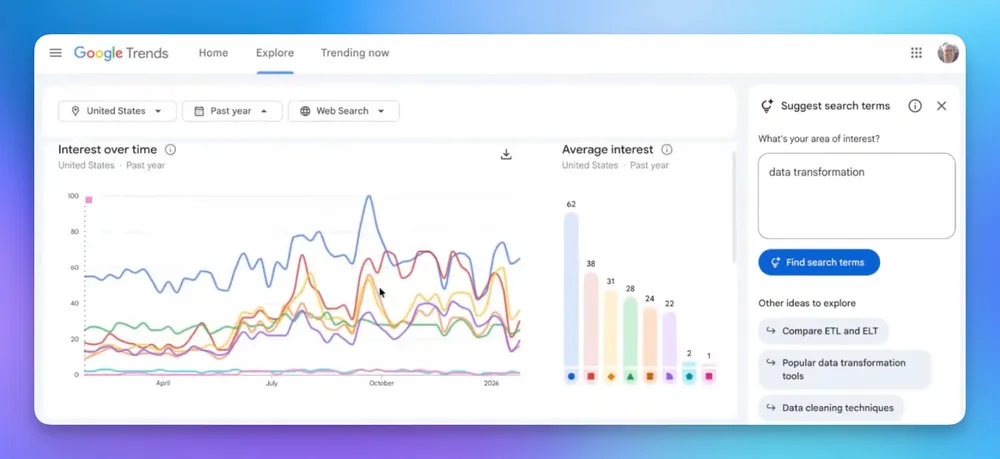
In January 2026, they added a Gemini-powered side panel that automatically identifies up to eight related search terms and populates them on the graph for comparison. By automatically generating these related searches, Trends is making the primary stages of topic analysis much richer for users like me.
Fine, I’ll start with the flashy new AI stuff
It’s the “Suggest search terms” button in the top-right corner of the window of the Explore page. It’s basically an agentic search function, and it’s pretty cool.
Instead of manually testing variations of a keyword, you can enter a single term or even a full sentence describing what you want to explore. Gemini then generates and compares trends for a list of up to eight suggested search terms automatically.

In the example above, I typed in a topic phrase: “data transformation.” Trends then displayed related ideas to explore further. They’re little colored tables, each with a short explanation. It suggested terms like data mapping, data pipelines, ETL, etc. It also suggested related topics like “data migration tools" and "data quality management."
You can scroll down from there and see how each of these terms is trending over time, in terms of search volume.

The UX is a lot more friendly with this AI chat window so I can run through a litany of related ideas with nearly instant results.
I use Trends to figure out a topic’s query surface area
Fundamentally, Google Trends is search query volume data. In other words: it’s providing the same type of insight that you get from tools like SEMrush or Ahrefs (but the data is more reliable because it’s coming from Google itself).
As we get more detailed data on specific queries, we can more precisely engage with the problems that our audience is trying to solve. And the more often we do that with content, the more authority we can build with the audience (as well as search engines).
This is what I refer to as search query surface area: the wide array of related questions that people might have on a given topic.
- How should I even think about this problem?
- How can I get the budget for doing this?
- What are the impacts?
- What are the challenges I'm going to face when I do this?
- Why is my homegrown solution not going to work or when is it not going to work?
Keyword data enables us to cover a wider query surface area. Trends provides a quick, if broad, view of that data.
The data from Trends is fast and loose
That’s part of the appeal: it gives me a quick, directional sense of how viable a topic is. Google Trends won’t provide exhaustive data. It does not give you absolute volume over time. But it will show you how popular a given topic is of late.
It provides the data that narrows the field of potential topics. Just as important as showing you which topics are worth your investment, this data will show you when a given topic is not worth it. This data lays the groundwork for subsequent data collection.
My process: moving from Trends data into community research
Let's say I’m running a company that helps business owners to improve their net dollar retention. We’re positioning our brand as the authority on that topic. The question remains: is this a topic that people are seeking out online? So I open Google Trends…
I go to “Explore” and enter a topic in the search bar: “net dollar retention.”

You can filter for results by country, which I find pretty useful. You can adjust time parameters. For B2B stuff, I usually start with the 1-year and 5-year parameters

The 1-year view here for “net dollar retention” isn’t particularly encouraging, so I’ll try the 5- year…

And that’s a pretty strong vote of confidence. Awesome. That’s the kind of trend line that I would use to confidently ground a content campaign for that topic.
Comparison features let me test adjacent topics
Let’s see how this “net dollar retention” idea compares to a related topic like “gross dollar retention.”

Both of these topics are indexed to the same numbers. The difference in relative volume and trajectory is pretty clear here, so “net dollar retention” would be the way to go.
Next, I’ll return to the “net dollar retention” data page and scroll down. To see the top queries for this topic over the past year.

What comes up in the “Top queries” column? Queries like net retention rate, what “net dollar retention” is… A variety of intro-level topics. Some are trending way up and others are trending way down. Regardless, this is good baseline intel to have.
Of course, you can get related queries from anywhere. You can get them from Google's own “People Also Ask” questions or from Google Search Console data, or whatever search analytics and data tool you're using. But Trends is quick, reliable, and increasingly easy to use.
Rising queries
And then the other thing that's over here is rising queries.

In this example, you can see that “net dollar retention rate” is showing some additional volume over the past year. (The 2026 product update doubled the number of "rising queries" displayed, which is cool. We get some more depth in that data.)
Between my initial trend search, suggested searches, then top query and rising query follow-ups, I exit from Trends with a handful of topic phrases that show promise. Next, I’ll use another tool to see how these topics are coming up in actual community discussions.
Google Trends data sets the stage for community research
Once the viability of a topic is validated by Trends data, I’ll authorize some more granular community research. The ultimate goal here is to create content that is responding to the most current concerns of our audience.
Until recently, the only way to find those specific questions was through manual research. Now, however, we can use LLMs to search for community discussions that relate to a given topic. I’ll use topic phrases and queries from Trends to initiate those searches.
For example: if Trends shows that “assortment optimization” is a trending topic, I’ll authorize some follow-up research in community forums.

This research shows us what, exactly, people are talking about within a given topic. It’s also showing us how they talk about it. And it’s not just Reddit – we can pull this info from LinkedIn, Y Combinator, traditional Google search, most any web-based platform.
The LLM returns a list of questions that it found in these various communities. I’ll manually vet the list to flag the ones that are actually relevant to our brand and audience. These questions will form the basis of new content: blogs, FAQs, social posts, etc.
Trends can streamline the early stages of a content process
In a matter of minutes, you can plug a few ideas into Google Trends, identify the topics that have real search potential, then use them to find specific customer concerns in community forums. You’ve gone from spitballing new topics to queuing up content – with data guiding every step.
None of the techniques are revolutionary but tools that implement them have come a long way. What really makes Google Trends awesome now is its enhanced data and the much more intuitive UX.
These tools are not a replacement for the strategic decision-making of marketers. They offer marketers a foundation for better decisions. With Google Trends data you can make sure that people are actually asking a question before you put the effort into answering it.